For Home Assistant
Your home, mapped and in sync.
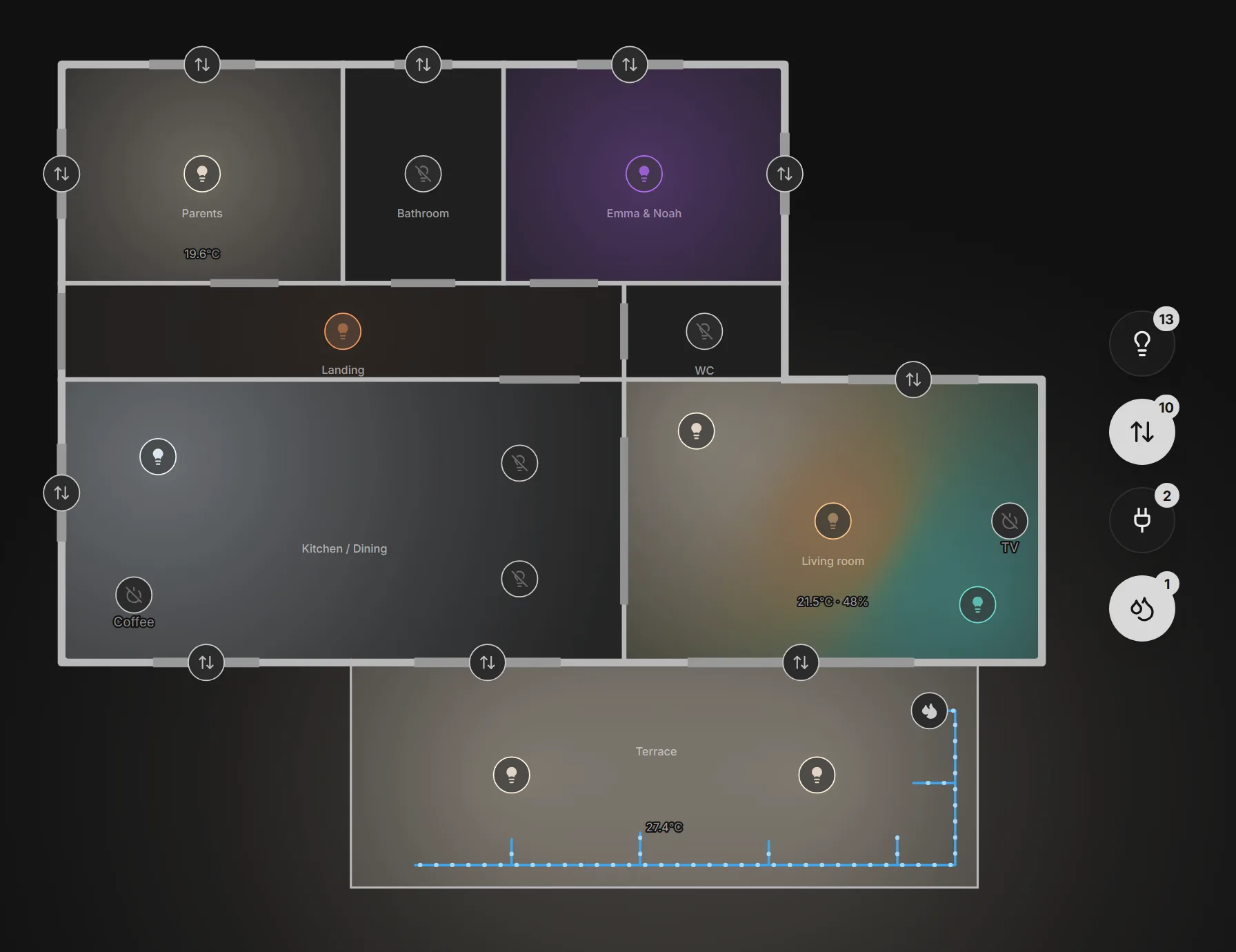
Your smart home on a floor plan. Visualize and control your connected devices via Home Assistant - at home or away, through our relay.
Free for one person, forever. Remote access included.
Works with Home Assistant OS and Container. Made for tablets and desktops.
How it works
From plan to control, in three steps
No tricky network setup. You draw, you link, you control.
Step 1
Draw your plan
Trace your walls, add rooms and floors in a simple 2D editor.
Step 2
Link your devices
Install our Home Assistant app and pair it with a code. Then pin lights, outlets and shutters on the plan and map them to your entities.
Step 3
Control live
Switch on, dim, open your shutters. Real state flows back in real time from your home.
Private by design
Your home stays yours
Stratorama never connects into your home. Our agent - a Home Assistant app, or a Docker container beside Home Assistant Container - opens one outbound connection to our relay, and your commands and device states travel through it.
No ports to open. Our agent makes an outbound connection, so nothing is exposed to the Internet.
No Home Assistant state stored. Only the devices on your plan reach a browser with their state, and only one allowed to see them. When someone who may edit the whole home opens the device picker, so do the devices not on the plan yet. All of it crosses our relay in memory.
You stay in control. Disconnect Home Assistant whenever you want, in one click.
Pricing
Free for you. Forever.
You only pay when you want the rest of the household in.
Free
€0forever
Everything you need to map your home and run it yourself, from anywhere.
- The full editor: rooms, walls, doors, windows, floors.
- Every device type: lights, LED strips, shutters, outlets, valves, sensors.
- Remote access through the relay, included. No port to open.
- No card, no trial, no expiry. We will never move a free capability behind Household.
Household
€3/ month, or €30 a year
One price for the whole home, not one per person.
- Everything in Free.
- Share your home with the people you live with, each with their own sign-in.
- Give each member only the floors and devices you choose.
- A dedicated credential for wall tablets, separate from your own account.
- Two months free on the yearly plan.
You create your account first, then we take you straight to payment.
Prices include VAT. Cancel online at any time, effective at the end of the period you paid for, and 14 days to change your mind with a full refund. The first 100 homes to subscribe keep their price for as long as their subscription runs, even once it goes up for new subscribers. Read the terms.
FAQ
Before you install anything
The questions worth asking before you sign up.
Which devices can I put on the plan?
Lights and LED strips (Home Assistant's light domain), roller shutters (cover), power outlets and electro-valves (switch), and read-only sensors (sensor: temperature, humidity, CO2, power and so on, plus binary_sensor for doors, windows, motion, leaks and smoke, which read Open / Closed or Wet / Dry rather than a number). Anything Home Assistant exposes in one of those domains, whichever integration is behind it - and each device is offered only the controls it can honour, so a non-dimmable light gets no dimmer and a shutter with no position gets Open / Stop / Close.
Do I need Nabu Casa or any remote-access setup?
No. The Stratorama app in your Home Assistant opens one outbound connection to our relay, and your browser talks to the relay. No Nabu Casa subscription, no port forwarding, no dynamic DNS, no reverse proxy - and nothing about your Home Assistant becomes reachable from the Internet.
Can it run entirely inside my Home Assistant, without the Internet?
Yes, with an experimental Home Assistant app also called Stratorama, in the same repository as our agent. Open it from Home Assistant's sidebar, and your plan, its devices and their states stay in your home: no account, no relay, nothing sent to us, and it keeps working without the Internet. Every Home Assistant user can open it, and you decide who may edit. It is free for one home and needs Home Assistant OS; its documentation says how to install it. Later, to open your home from anywhere, you can take it online: its plan is copied to stratorama.app once.
Does it work with Home Assistant Container?
Yes. On Home Assistant OS, Stratorama connects through a Home Assistant app (formerly called an add-on). Container cannot run apps, so there the same agent runs as a Docker container beside Home Assistant: one compose file with your Home Assistant's address and an access token you create for it, which never leaves your network. Stratorama's Connection panel walks you through either, and the setup guide has the details. An older Supervised install runs the app too, though Home Assistant no longer supports it.
Where is my data stored?
On our own servers at OVH in Gravelines, France, inside the EU: your account, your plans and the bindings between your elements and your Home Assistant entities. Encrypted backups go to Scaleway in Paris. Transactional emails go through Resend (United States) and, if you subscribe, payments through Stripe. The privacy policy lists every processor and how long each thing is kept.
What does Stratorama see of my home?
The devices you put on the plan: from version 1.4.0, theirs are the only states the Home Assistant app sends as they change (their readings, your doors' sensors and your device library included). When someone with edit access to the whole home opens the device picker, it also sends your lights, switches, covers and sensors that are not on the plan yet, each with its current state and attributes (a sensor reporting a phone's address included, with its coordinates), for that person's browser alone; a device already on the plan is not in that list. Everything else stays in your Home Assistant: its people and device trackers, your cameras. An older version of the app still sends more (every light, switch, cover and sensor from 1.3.0, every state before that), and our relay drops what it did not ask for as it arrives, before any browser. What crosses does so in memory only, never written to disk, and each browser is sent only the devices it is allowed to see. What we keep is the entity ids you bind to the plan. Ordinary actions, a light or a shutter, are not recorded. Switching a device we class as consequential (today: electro-valves, because water starts running) leaves an entry saying who, which device and when, readable by the home's owner only. We never see the token the Home Assistant app uses to sign in to your Home Assistant: it keeps it to itself. For the whole path, hop by hop, and what our relay checks before it forwards anything, read how Stratorama connects.
How do I disconnect?
In Stratorama, Menu > Home Assistant > Connection > Disconnect Home Assistant revokes the Home Assistant app's credential at once; the connection drops within a second. Uninstall the app to remove the last trace from Home Assistant. Deleting your account cuts the link immediately too, and removes your home and plans after a 30-day grace period (a shared home passes to another member instead, and stays connected to Home Assistant).
Can I use it on my phone?
Stratorama is made for tablets and desktops, and a wall-mounted tablet is its natural home. On a phone you can sign in and control your home in presentation mode, but drawing needs the room a larger screen gives: the editor has no phone layout yet.

Give your connected home a map.
Free. Build your plan in minutes.
Built and run by one independent maker. The Home Assistant app is open source under the MIT licence: read it on GitHub.